Powered by Blogger.

Labels

Meet The Author

Experience

Blogroll

Labels

Featured 1

Curabitur et lectus vitae purus tincidunt laoreet sit amet ac ipsum. Proin tincidunt mattis nisi a scelerisque. Aliquam placerat dapibus eros non ullamcorper. Integer interdum ullamcorper venenatis. Pellentesque habitant morbi tristique senectus et netus et malesuada fames ac turpis egestas.

Featured 2

Curabitur et lectus vitae purus tincidunt laoreet sit amet ac ipsum. Proin tincidunt mattis nisi a scelerisque. Aliquam placerat dapibus eros non ullamcorper. Integer interdum ullamcorper venenatis. Pellentesque habitant morbi tristique senectus et netus et malesuada fames ac turpis egestas.

Featured 3

Curabitur et lectus vitae purus tincidunt laoreet sit amet ac ipsum. Proin tincidunt mattis nisi a scelerisque. Aliquam placerat dapibus eros non ullamcorper. Integer interdum ullamcorper venenatis. Pellentesque habitant morbi tristique senectus et netus et malesuada fames ac turpis egestas.

Featured 4

Curabitur et lectus vitae purus tincidunt laoreet sit amet ac ipsum. Proin tincidunt mattis nisi a scelerisque. Aliquam placerat dapibus eros non ullamcorper. Integer interdum ullamcorper venenatis. Pellentesque habitant morbi tristique senectus et netus et malesuada fames ac turpis egestas.

Featured 5

Curabitur et lectus vitae purus tincidunt laoreet sit amet ac ipsum. Proin tincidunt mattis nisi a scelerisque. Aliquam placerat dapibus eros non ullamcorper. Integer interdum ullamcorper venenatis. Pellentesque habitant morbi tristique senectus et netus et malesuada fames ac turpis egestas.

Showing posts with label Rainmeter. Show all posts

Wednesday, May 09, 2012

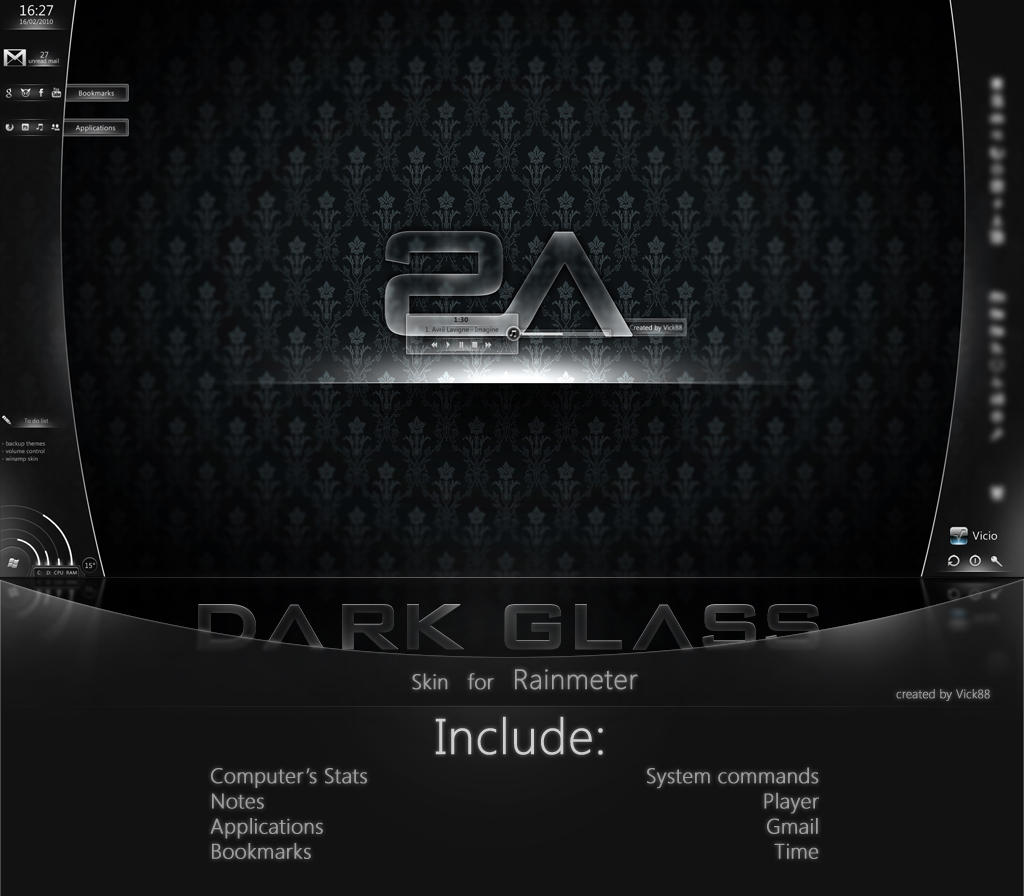
+MOD+ Dark Glass for Rainmeter


******************************************
*********||DARK GLASS for Rainmeter||**********
******************************************

***** Wallpaper: Dark Glass Wallpaper


Click Me To Download

Saturday, May 05, 2012

FlyAway 2 For Rainmeter


Install:
copy all fonts to %windows/fonts%
copy all folders to %skin directory of rainmeter%
copy all plugins to %rainmeter instalation directory/ plugins%


Click Me To Download

Razor


1. AniDate: Show date, sleep, shut down, restart funtions & there is a circle spin around it.


2. Fusion: You can see Clock, Weather & CPU, RAM, SWAP status on this stuff, there are 3 skin: Glass, Dark & Light.
Default Temp is °C & my Location (Garland, TX), If you want change, go to this page: [link] to find your location, then open my .ini file, find Location=2408980 then replace it by yours, Unit= C (is °C) or F (is °F)

3. iFiles: these are new skins for Rainmeter, it can measure size folders, count items, it need a new plug-in FileListPlugin.dll (place it on Plugins directory), you can create another by yourself: just copy my skin, rename it, open .ini file, you will see
eg:
...
WildcardSearch=*.jpg;*.jpeg;*.png;*.bmp ---> type of files
Path=E:\Pictures ---> place you want measure
...

4. MultiDock: a complicating dock, you can easy edit it as your wish, main screen that is your HDDs, there are 5 tabs & a back button to return mainscreen anytime you like
Remember edit for links

5. And many other stuffs...

Wallpaper: Actually not mine, I just edit from this [link]
And special thanks Artist's Icons


Click Me To Download

-Blank .PSD for Multidock[link]
-A longer indicator for Gmail [link]

Eker lina rainmeter The SKIN


Click Me To Download